TopTrendyReviews Product Guide
M.2 NVMe to USB 3.1 SSD Adapter – 10Gbps
A compact adapter for connecting compatible M.2 NVMe solid-state drives to a computer or laptop.

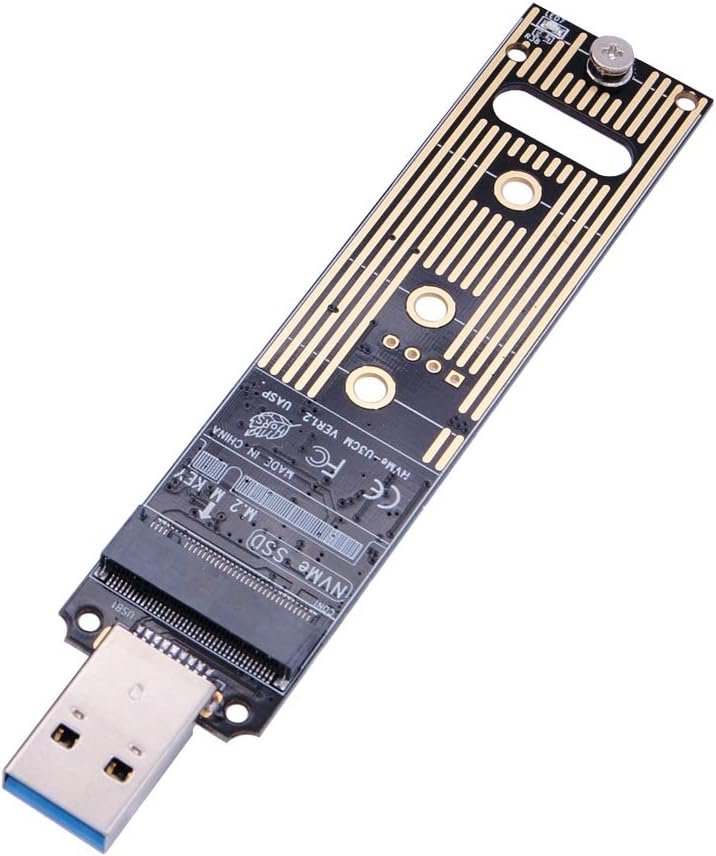
Need to access data on a compatible M.2 NVMe SSD without installing it inside a desktop or laptop? This M.2 NVMe to USB 3.1 Gen 2 adapter is designed to connect supported PCIe NVMe solid-state drives directly to a computer through a USB connection. Its compact, cable-free design can be useful for data access, drive testing and transferring files from a compatible SSD.
Product Highlights
- USB 3.1 Gen 2 interface: Advertised transfer interface speed of up to 10Gbps.
- NVMe SSD support: Designed for compatible PCIe NVMe M-Key and M+B-key SSDs.
- Multiple drive lengths: Supports the stated 2230, 2242, 2260 and 2280 sizes.
- Plug and play: The product description states that no additional driver is needed for supported setups.
- Direct connection: Connects without a separate USB cable.
- Selected Samsung SSDs: Includes several Samsung 950, 960 and 970 series models among the listed compatible drives.
Key Features
1. Connect an M.2 NVMe SSD Through USB
This adapter is designed to let a compatible M.2 NVMe SSD connect to a computer or laptop through USB. It may be useful when accessing files, checking a spare drive or transferring data without fitting the SSD into an internal M.2 slot.
2. USB 3.1 Gen 2 with Up to 10Gbps Interface Speed
The adapter is advertised with a USB 3.1 Gen 2 bridge chip and a maximum interface rate of 10Gbps. Actual file-transfer speeds depend on the SSD, host USB port, computer hardware, file type and other system limitations. The advertised interface rate is not a guarantee of sustained real-world transfer speed.
3. Supports Common M.2 Drive Lengths
The listed supported sizes are 2230, 2242, 2260 and 2280. These numbers refer to the physical dimensions of the M.2 drive. Before purchasing, check both your SSD’s length and its interface type.
4. Direct, Cable-Free Design
The adapter is described as connecting directly through USB without a separate USB cable. This can reduce cable clutter when using a compatible drive with an accessible USB port.
5. Compatible with Selected Samsung SSDs
The supplied compatibility list includes Samsung 950 Pro, 960 Evo, PM951, PM961, SM951, SM961, 970 Evo and 970 Pro drives, along with other compatible PCIe NVMe M-Key SSDs. Confirm the exact SSD model and interface before connecting it.
Product Specifications
| Product type | M.2 NVMe SSD to USB adapter |
| USB interface | USB 3.1 Gen 2 |
| Advertised interface rate | Up to 10Gbps |
| Supported SSD interface | PCIe NVMe M-Key and M+B-key, as specified |
| Supported drive sizes | 2230, 2242, 2260 and 2280 |
| Installation | Direct USB connection; described as plug and play |
| Example compatible models | Selected Samsung 950 Pro, 960 Evo, PM951, PM961, SM951, SM961, 970 Evo and 970 Pro SSDs |
Important Compatibility Notes
This adapter does not support every M.2 SSD. According to the supplied product information, it does not support:
- B-Key M.2 SSDs that use the SATA interface.
- M-Key M.2 SSDs that use the PCIe AHCI protocol rather than NVMe.
Check your drive’s documentation to confirm that it is a supported PCIe NVMe SSD. The M.2 form factor alone does not guarantee compatibility. Also check the computer’s USB port capabilities, and ensure the SSD is securely installed before connecting the adapter.
Who Might Find This Adapter Useful?
- Users who need to access files on a compatible spare NVMe SSD.
- PC builders and technicians working with supported M.2 drives.
- People transferring data from a compatible SSD.
- Users who want to test or inspect a supported drive outside a computer’s internal M.2 slot.
Final Thoughts
The M.2 NVMe to USB 3.1 Gen 2 Adapter offers a direct way to connect supported NVMe SSDs to a computer. Its advertised 10Gbps interface rate, support for several common M.2 drive lengths and cable-free connection make it worth considering for compatible drives. The most important step is to verify your SSD’s protocol and key type before ordering, since SATA-based and PCIe AHCI-based drives are listed as unsupported.
Check the M.2 NVMe USB Adapter
Visit the product listing to review further details and purchasing information.
Buy Now